What’s the difference between a project and a design?
A project is the folder, a design is one quilt inside it. Where each lives and how to move between them.
A project works like a file folder, and a design is one individual quilt inside it. A project can hold as many designs as you like, so one project can carry a whole series: the throw, the queen version, the two colorway experiments you’re not sure about yet.
The top bar shows both names, Project / Design. Tap each to rename.

Tip: If you only plan to create one design for a project, you can name both the project and the design the same name.
To switch between designs — or add a new one, copy one as a starting point, or delete one — open the Designs panel on the left rail: it lists every design in the project you have open.
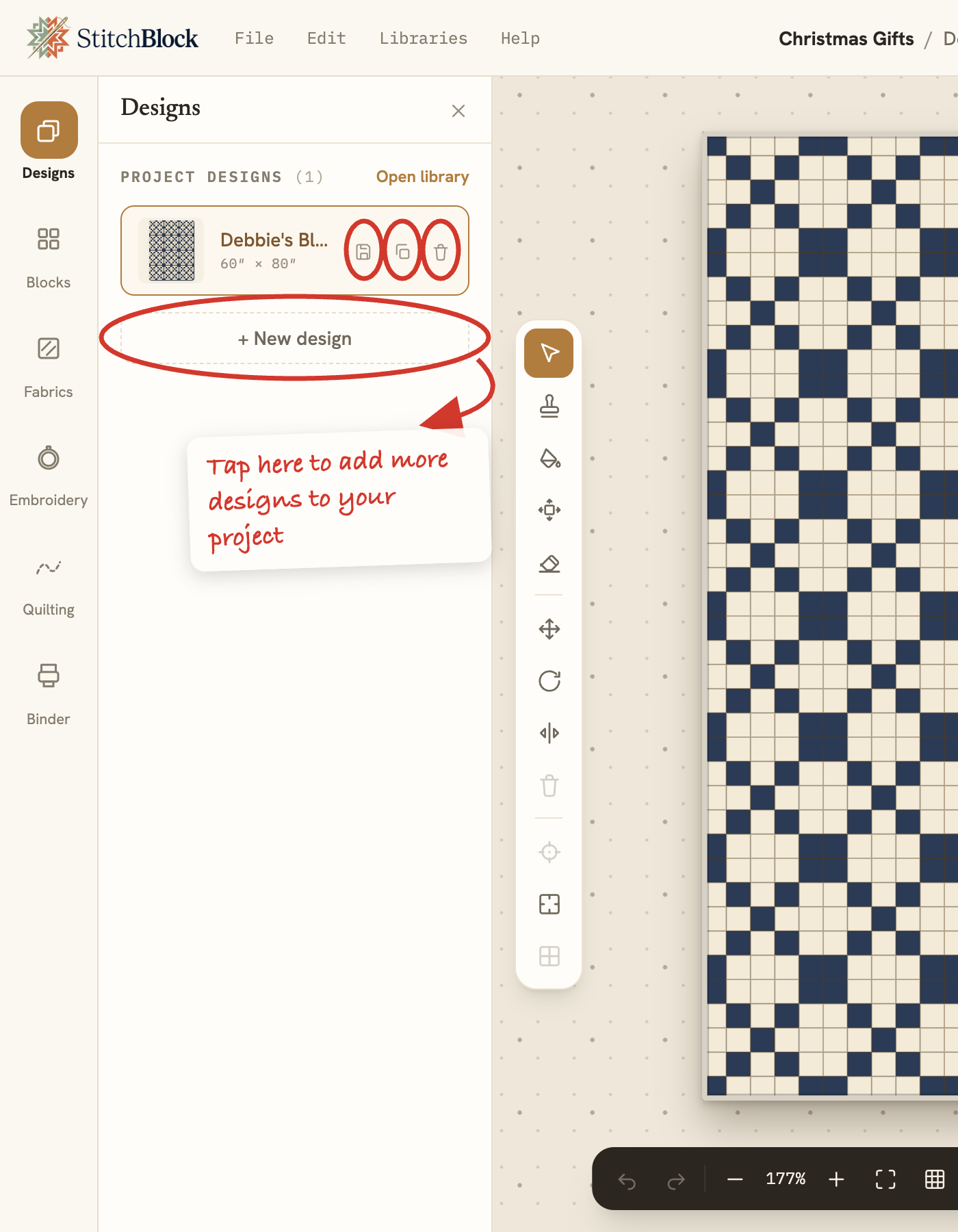
Every design in the list carries the three small buttons circled above. Save to library (the disk) puts a copy of the design in your Designs library, ready to grab in any project. Duplicate (the pages) makes a copy right here in this project — a handy starting point for trying a variation. Delete (the trash can) removes the design from the project for good — it asks first. And below the list, + New design adds another design to the project.
The Designs library (Libraries → Designs) holds your saved designs — quilts you keep to grab quickly in any project, whether that’s a design you make again, a Haberdashery copy, or a layout you start from again and again. Your own saved designs list first, then the starter set.
Tip: The design name becomes the name on the pattern — and you can turn the project name on the pattern on or off in Binder Settings.