Quilt block by block with your own designs
Place purchased continuous-line designs block by block: tap the blocks you want, mix designs on one quilt, or cover every block in one tap. Files sew at their true size, and SmartBlock Hooping can pick the right size file for every block.
A continuous-line block design quilts one block in one hooping. It is a single unbroken line of stitching sized for a block. StitchBlock has no built-in quilting designs. This page is about placing the files you've purchased, block by block, right on the quilt picture. What you see is what the stitch files sew.
Add the designs to your project
Open Quilting on the left rail, choose Open library, then My Quilting, and upload your purchased files onto the Continuous line blocks shelf. Files that are the same design in another size nest together on their own, and the review card tells you so. See Upload & organize your design files. Add the sizes you want to the project.
Place them on the quilt
In the Quilting panel's Block designs section, tap a design to arm it, then tap blocks on the quilt. Each tap places the design in that block. Tap a placed block again to clear it. Arm a different design and your taps place that one. Blocks you've already placed keep what they have, so one quilt can mix designs.
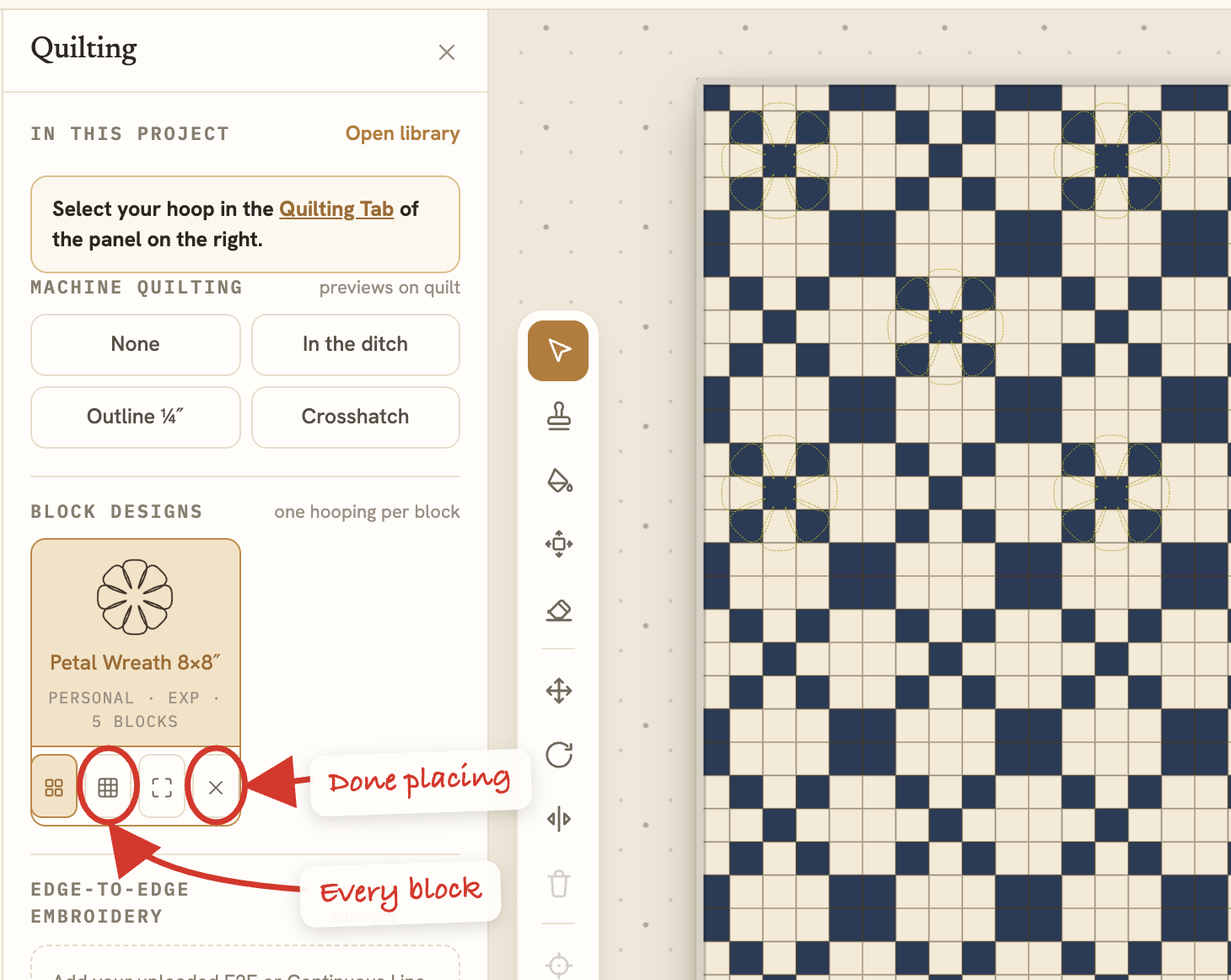
The armed design's card has a row of icon chips. The grid chip, Every block, places the design on every block in one tap, and a second tap takes it back off. The ✕ chip, Done placing, puts the design down when you're done.
Tip: Purchased edge-to-edge sets often come with square files that work both ways. When a file fits your hoop, its card also offers Edge to edge. Tap it and the file tiles across the whole quilt instead. See Quilt edge-to-edge with a purchased embroidery set.
Or let SmartBlock pick the sizes
A purchased design usually comes in several sizes, and SmartBlock can pick among them for you. On the design's card in the library, tap Use SmartBlock Hooping. For every block it picks the largest of the folder's files that fits both the block and your hoop. A quilt with two block sizes gets two different files from the same folder.
The Quilting panel then shows the folder with a SmartBlock Hooping badge and one sentence that says what it chose: which files, and how many hoopings in your hoop. You can always change its picks. Arm a file and tap blocks. The other blocks keep what SmartBlock chose.
True size
A file you pick by hand goes into its block at the size the designer made it. It is centered, it turns with on-point blocks, and it is never resized. When a file is small for your blocks, a note offers the folder's larger size instead. A file larger than your blocks won't place at all, and the panel says so.
Sew it
On the Inspector's Add-Ons tab, under Quilting, Your kit lists one download row for each design: your purchased file at 100%, unchanged, with its hooping count. The Binder's E2E Quilting sheet groups the hoopings by design and names which blocks each file sews. Block designs suit quilt-as-you-go. Each block hoops flat on its own, so it is easy to place and you don't move a whole quilt sandwich through the machine.